Vertical Slice Architecture
Status
In Progress
| Date | Version | Author | Description |
|---|---|---|---|
| 2024-11-28 | 0.1.2 | Iskander | Working on Runtime Architecture |
| 2024-11-20 | 0.1.1 | Iskander | Working on Project Structure |
| 2024-11-15 | 0.1 | Iskander | Initial draft |
The vertical slice architecture is a software architecture pattern that structures the codebase by feature or functionality. This pattern is in contrast to the traditional layered architecture that structures the codebase by technical concerns such as data access, business logic, and presentation.
References
- Vertical Slice Architecture
- Vertical Slice Architecture: The Best Ways to Structure Your Project
- Designing for change with Vertical Slice Architecture - Chris Sainty - NDC Oslo 2024
- Vertical Slice Architecture Project Setup From Scratch
- Vertical Slice Architecture
Comparison with Layered Architecture
The vertical slice architecture is in contrast to the traditional layered architecture. In the layered architecture, the codebase is structured by technical concerns such as data access, business logic, and presentation. The layered architecture typically consists of the following layers:
- Presentation Layer: Contains the user interface components such as views, controllers, and view models.
- Business Logic Layer: Contains the business logic components such as services, repositories, and domain models.
- Data Access Layer: Contains the data access components such as repositories, data contexts, and data models.
- Database: Contains the database schema and data.
This approach can lead to a number of issues such as:
- Cross-cutting Concerns: The code for a single feature is spread across multiple layers, making it difficult to understand and maintain.
- Dependency Management: The layers are tightly coupled, making it difficult to change one layer without affecting the others.
- Testing: The layers are difficult to test in isolation, as they are tightly coupled ultimately with the database.
- Rigidity: All features are build using the same layers, making it difficult to change the architecture to accommodate new requirements.
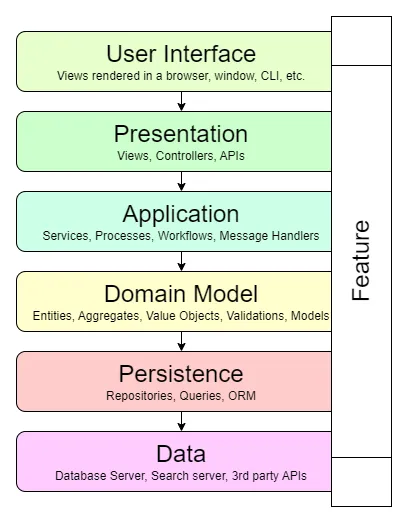
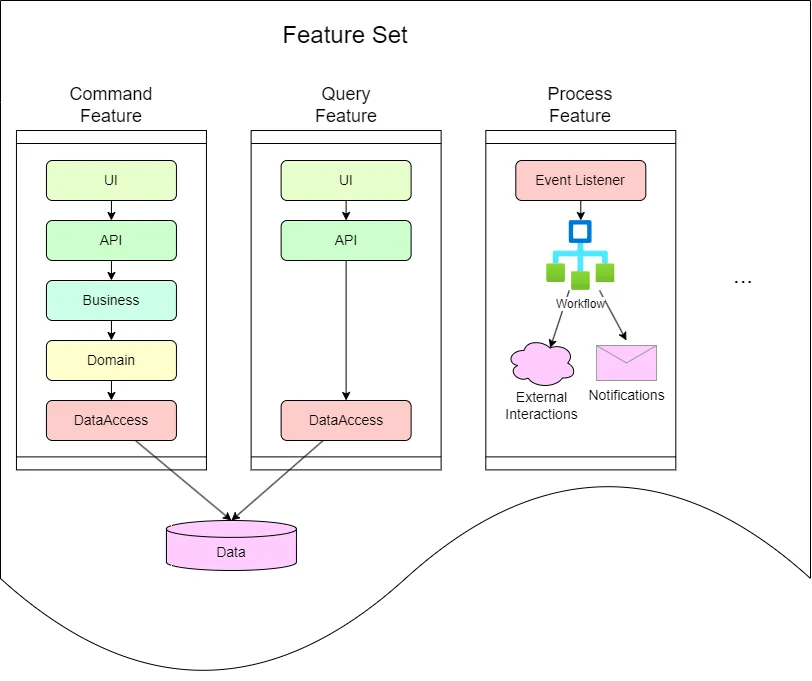
The vertical slice architecture addresses these issues by structuring the codebase by feature or functionality. Each feature is implemented as a vertical slice that contains all the necessary components such as controllers, services, repositories, and view models. This approach has several benefits:
- Modularity: Each feature is self-contained and isolated from other features, making it easier to understand and maintain.
- Loose Coupling: The components within a vertical slice are loosely coupled, making it easier to change one component without affecting the others.
- Testing: Each feature can be tested in isolation, making it easier to write unit tests and integration tests.
- Flexibility: The architecture can be easily changed to accommodate new requirements, as each feature is implemented as a vertical slice.
Implementation
In the following sections we will develop a sample feature set using the vertical slice architecture.
Without trying to be exhaustive, we will use the Project Management domain as an example, and the Project entity as the main focus of our feature set.
User Stories
The project entity have the following use cases, which are translated as features in the vertical slice architecture:
- Create Project: Create a new project.
- Update Project: Update an existing project.
- Delete Project: Delete an existing project.
- Get Project: Get an existing project details by its identifier.
- List Projects: List all existing projects.
For each use case, a User story is created to detail the feature requirements. For example, for the Create Project feature, the user story could be (using Gherkin syntax):
Feature: Create Project    As a Platform Administrator    I want to create a new project    So that I can assign it to a client
    Scenario: Create a new project        Given I have a project name "Sample Project"        And I have a project code "sample"        When I create a new project        Then the project should be created successfully        And I should be taken to the project list page, where the new project is listed
    Rule: There are field validations        Scenario: Create a new project with empty fields            Given I have a project name ""            And I have a project code ""            When I create a new project            Then the project should not be created            And I should see an error message "Project name is required"            And I should see an error message "Project code is required"
Rule: There can be only one project with the same code Scenario: Create a new project with an existing code Given I have a project name "Sample Project" And I have a project code "sample" And there is an existing project with code "sample" When I create a new project Then the project should not be created And I should see an error message "Project code is already in use"This user story gives a lot of information about the feature requirements, and can be used as a basis for the implementation of the feature. It event gives hints to other related features, such as the List Projects feature.
The first step is to pick an existing microservice solution where this feature set will be implemented, or to create an entirely new solution.
Runtime Architecture
The different types of features, like Command, Query, Processing, etc., can have different architectures, but in general, they share similar patterns.
We are mostly using Event Sourcing and CQRS for designing features.
Query Feature Architecture
The query features are the simplest of all, as they only need to retrieve information from the system, as quickly as possible. The architecture for a query feature could be as follows:
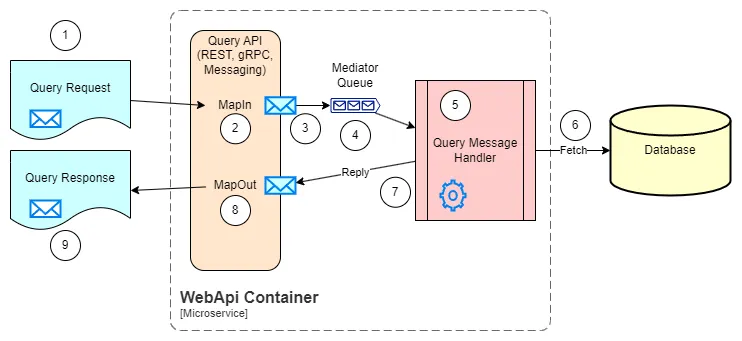
- Query Request Models: Contains the models required to make the query request. Depending on the API protocol (REST, gRPC, Messaging, etc.), the models should follow the specific conventions and requirements. E.g. for REST APIs, the models should be serializable to JSON.
- Map in: The purpose of all API implementation is to document the input/output models, and to map the models in and out of the business layer. The Riok.Mapperly library is used in the current implementation.
- Send the query to the business layer: The query is sent to the business layer, through a message bus, allowing to decouple the API from the business layer. A validation is performed before sending the query to the business layer, to check for any missing or invalid data.
- Mediator Queue: A Mediator pattern is used to decouple the API from the business layer. The transport could be in-process or through a message broker. The Wolverine library is used in the current implementation.
- Query Message Handler: Implements the business logic for the query. It should be as simple as possible, and should not contain any business logic beyond turning the filters, sorting and paging into a query to the database, and mapping the result to a response message.
- Execute the request to the database: The query message handler executes the query to the database, using the data access layer. The Marten library is responsible for this in the current implementation.
- Reply to Mediator: The query message handler replies to the mediator with the result of the query.
- Map out: The result of the query is mapped to the response model, and sent back to the API.
- Query Response Models: Contains the models required to return the query response. Depending on the API protocol (REST, gRPC, Messaging, etc.), the models should follow the specific conventions and requirements. E.g. for REST APIs, the models should be serializable to JSON.
Aggregate Command Feature Architecture
The command features are more complex than the query features, as they need to modify the system state. The architecture for a command feature could be as follows:
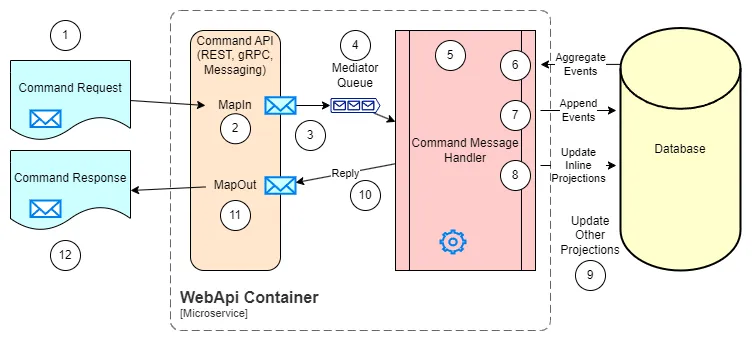
- Command Request Models: Contains the models required to make the command request. Depending on the API protocol (REST, gRPC, Messaging, etc.), the models should follow the specific conventions and requirements. E.g. for REST APIs, the models should be serializable to JSON.
- Map in: The purpose of all API implementation is to document the input/output models, and to map the models in and out of the business layer. The Riok.Mapperly library is used in the current implementation.
- Send the command to the business layer: The command is sent to the business layer, through a message bus, allowing to decouple the API from the business layer. A validation is performed before sending the command to the business layer, to check for any missing or invalid data.
- Mediator Queue: A Mediator pattern is used to decouple the API from the business layer. The transport could be in-process or through a message broker. The Wolverine library is used in the current implementation.
- Command Message Handler: Implements the business logic for the command. The simples of the commands only have to deal with updating a single aggregate. More complex commands could require the implementation of a process spanning multiple aggregates and external services.
- Aggregate existing events: The command message handler aggregates the existing events for the aggregate, using the data access layer.
- Emit new events: The command message handler, using the loaded aggregate current state and the information in the requested command, decides and emits new events to the aggregate, using the data access layer.
- Update inline documents: Any inline document that needs to be updated in the same transaction as the aggregate, is updated here. The Marten library is responsible for this in the current implementation.
- Update off-line documents: Any off-line document that needs to be updated in a separate transaction from the aggregate, is updated here. The Marten library is responsible for this in the current implementation.
- Reply to Mediator: The command message handler replies to the mediator with the result of the command.
- Map out: The result of the command is mapped to the response model, and sent back to the API.
- Command Response Models: Contains the models required to return the command response. Depending on the API protocol (REST, gRPC, Messaging, etc.), the models should follow the specific conventions and requirements. E.g. for REST APIs, the models should be serializable to JSON.
Processing Feature Architecture
We will be using Temporal.io for the processing features, but the architecture is still to be defined.
Solution Structure
For this example, we are using the solution hosted in Tdp.Projects solution.
This solution includes the following items:
- Main Project: Contains the implementation of the features included in current service.
- Test Project: Contains the unit tests for the features included in the main project.
- Web API: Contains the executable project that will host the APIs defined in the main project.
- Service Defaults: Contains the .NET Aspire common configurations for the solution.
- Application Host: Contains the .NET Aspire Host project to launch the dashboard, services and other components like the database.
- Solution Items: Contains the solution items like the .gitignore file, the .sln file, etc.
All projects should share the same namespace prefix, like Tdp.Projects, to make it easier to reference classes and objects across the solution.
For the example, the solution structure is as follows:
- Tdp.Projects.sln
DirectoryTdp.Projects Main project
- Tdp.Projects.csproj
- … other files
DirectoryTdp.Projects.AppHost Application Host
- Tdp.Projects.AppHost.csproj
- … other files
DirectoryTdp.Projects.ServiceDefaults Service Defaults
- Tdp.Projects.ServiceDefaults.csproj
- … other files
DirectoryTdp.Projects.WebApi Web App Executable
- Tdp.Projects.WebApi.csproj
- … other files
Directorytest
DirectoryTdp.Projects.Tests Test project
- Tdp.Projects.Tests.csproj
- … other files
Directory‘Solution Items’ Miscellaneous files
- .editorconfig
- .gitattributes
- .gitignore
- global.json
- LICENSE.txt
- nuget.config
- README.md
- … other files
Main Project Structure
The main project contains the implementation of the features included in the service.
Even when the unit of design and implementation is the feature (representing use cases), some features share a common purpose, e.g. User management, Project management, etc. These features are grouped into feature sets.
So the overall structure of the main project is as follows:
DirectoryFeatureSet1
DirectoryFeature1.1
- … design and implementation files
DirectoryFeature1.2
- … design and implementation files
- … other features
- … shared files for this feature set (e.g. models, services, etc.)
DirectoryFeatureSet2
DirectoryFeature2.1
- … design and implementation files
DirectoryFeature2.2
- … design and implementation files
- … other features
- … shared files for this feature set (e.g. models, services, etc.)
- … other feature sets
- … shared files for the main project (e.g. models, services, etc.)
As an example for the Projects service, the structure could be as follows:
DirectoryProjectFeatureSet
DirectoryCreateProjectFeature
- Business\
- DataAccess\
- RestApis\
DirectoryUpdateProjectFeature
- Business\
- DataAccess\
- RestApis\
DirectoryProjectListFeature
- Business\
- DataAccess\
- RestApis\
- ProjectBusinessSharedModels.cs
- ProjectDataAccessSharedModels.cs
- ProjectRestApisSharedModels.cs
DirectoryClientFeatureSet
DirectoryCreateClientFeature
- Business\
- DataAccess\
- RestApis\
DirectoryUpdateClientFeature
- Business\
- DataAccess\
- RestApis\
DirectoryClientListFeature
- Business\
- DataAccess\
- RestApis\
- ClientBusinessSharedModels.cs
- ClientDataAccessSharedModels.cs
- ClientRestApisSharedModels.cs
- Setup.cs
Some files that could be found at first level in the main project are:
Tdp<Projects>.cs: It is a marker class for the assembly, where we store some constants forNameandVersion, access to theAssembly,ActivitySource,Meter, etc.Tdp<Projects>Extensions.cs: Contains any extension method required from the Web API project, or any other project that needs to include functionality from the main project.AddTdp<Projects>(): Configures aWebApplicationBuilder(ASP.NET Core) to include all the required services from the main project.AddRestApis(): Takes care of adding all the REST APIs from the main project and all requires services for using MinimalAPIs, Controllers, Authentication, OpenAPI, etc.AddTdpCore(): Add shared services fromTdp.Core, likeIIdGenerator,IRequestContext, etc.AddValidatorsFromAssemblyContaining(): Registers all message validators (FluentValidation) from the main project.AddTdpMarten(): Sets up the Marten database context. It can be fully configurable, but as a general rule, it should be only indicated the schema name, which should be unique for every service.AddTdpWolverine(): Sets up the Wolverine message transport. You should only need to indicate the assembly where the message handlers are located.Register(): Search for all modules (IServiceCollectionModule) in the given assembly to register all required services and dependencies. You can usebuilder.Services.DebugPrintServicesCsv()to print in the console or in a file all the services registered, in case you need to debug the service registration and check if there is any missing service.AddTdpOpenTelemetry(): Indicates, for the OpenTelemetry services, the name of current project, allowing traces and metrics to be registered with the correct name.
MoveToCore.cs: It is a mostly empty file, that could contain some shared code that it is intended to be moved to theTdp.Coreproject. So it contains temporary code that will be moved after it has been tested enough in the current project.
Feature Set Structure
The folder name for a feature set could follow some recommended conventions, like:
- Use the
Featuressuffix, e.g.ProjectFeatures,ClientFeatures,UserFeatures, etc. - Use the
FeatureSetsuffix, e.g.ProjectFeatureSet,ClientFeatureSet,UserFeatureSet, etc. - Use the
Managementsuffix, e.g.ProjectManagement,ClientManagement,UserManagement, etc.
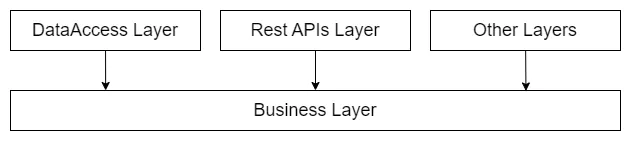
Even when each feature in a feature set can have its own structure, there are some common layers that most features will use:
- Business Layer: Contains the business logic for the feature, including services, validators, and other business components.
- Data Access Layer: Contains the data access logic for the feature, including repositories, data contexts, and other data access components.
- REST APIs Layer: Contains the REST APIs for the feature, including controllers, view models, and other API components.
Dependency between layers follows the rules:
- Business Layer: Cannot depend on any other layer.
- Data Access Layer: Can depend on the Business Layer, but not on the REST APIs Layer.
- REST APIs Layer: Can depend on the Business Layer, but not on the Data Access Layer.
Typically the Business Layer is the core of any feature, and the rest of layers can depend on it, but not among them.
In the first level of the feature set, there can be shared models for the rest of the features, like enums, constants, domain events, etc. For each layer, there must be a separate file to make easier to detect improper dependencies.
<FeatureSet>Business.cs: Contains shared models for the business layer, like:- Constants
- Enums
- Models
- Domain events: Events that are raised by the business layer and can be handled by other components.
- Field Validations: Validators for the different fields. Later, the model validators can use the shared validators to validate the fields.
- Domain Exceptions: Exceptions that are raised by the business layer and can be handled by other components.
- Data Constraints: Constraints for the data, to represent in the business layer any constraint that is defined in the data access layer.
<FeatureSet>DataAccess.cs: Contains shared models for the data access layer, like:- Persistent Enums: Event when the enum could be the same as in the business layer, it is recommended to have a separate file for the data access layer. Because the the business enum can evolve in time and have some values removed, the data access enum should be kept as is to avoid breaking the database.
- Persistent Domain Events: The same as with the enums, the domain events can evolve in time, and the data access layer should keep the original events to avoid breaking the database.
- Model Mappers: Contains the mappers to convert between business models and data access models.
- Service Module: Allows registering the events, if using Marten, or any other service required for the data access layer.
<FeatureSet>RestApis.cs: Contains shared models for the REST APIs layer, like:- Constants: Constants for the REST APIs, like the base route, API tags, etc.
Feature Set Business Domain Events
A domain event represents a fact that can be issued by any command handler in the system as a reaction to change request to the system. They should allow to represent all the details of the event, and should be immutable. It is useful to define a base class for the domain events of a feature set, but it depends on the complexity of the feature set.
public abstract record ProjectEventDto;
public record ProjectWasCreatedDto(    string Alias,    string DisplayName,    ProjectStatusDto Status) :    ProjectEventDto;
public record ProjectDescriptionsWereUpdatedDto(    string DisplayName) :    ProjectEventDto;
public record AliasWasUpdatedDto(    string Alias) :    ProjectEventDto;
public record ProjectStatusWasUpdatedDto(    ProjectStatusDto NewStatus,    string PublicReason,    string InternalReason) :    ProjectEventDto;
Feature Set Business Validations
The feature set can define some shared validation definitions using FluentValidation library.
A sample validation helper class is as follows:
public static partial class ProjectValidations{    public static readonly TextValidationDefinition ProjectId =        Validations.EntityId(ProjectIdGenerator.IdPrefix);
    public static readonly OptionalTextValidationDefinition OptionalProjectId =        Validations.OptionalEntityId(ProjectIdGenerator.IdPrefix);
    [GeneratedRegex("^[a-z][a-z0-9]*$")]    private static partial Regex ProjectCodeRegex();
    public static readonly TextValidationDefinition ProjectCode =        Validations.Text(new()        {            MinLength = 1,            MaxLength = 20,            Pattern = ProjectCodeRegex(),            PatternMessageProvider = s => "'{PropertyName}' must start with lowercase letter and contain only lowercase letters and decimal digits."        });
    public static readonly TextValidationDefinition DisplayName =        Validations.DisplayName();
    public static readonly EnumValidationDefinition<ProjectStatusDto> ProjectStatus =        Validations.Enum<ProjectStatusDto>();}
Feature Set Business Constraints
A constraint is a replacement of using Exceptions, which could impact the performance.
It is just a simple parameter-less record, which makes possible having a pre-created instance, or it could have some parameters to allow a more complex constraint.
public record DuplicatedAliasValidationConstraint : AggregateSessionCommitResult.ViolatedConstraint{ public static readonly DuplicatedAliasValidationConstraint Instance = new();}// Orpublic record DuplicatedAliasValidationConstraint(string DuplicatedAlias) : AggregateSessionCommitResult.ViolatedConstraint;Feature Set Data Access Models
Any enum or model that requires to be persisted in the business layer, must be replicated in the data access layer, with their corresponding mappers. This is to avoid breaking the database when the business model evolves.
public abstract record ProjectEvent;
public record ProjectWasCreated(    string Alias,    string DisplayName,    ProjectStatusDao Status) :    ProjectEvent;
public record ProjectDescriptionsWereUpdated(    string DisplayName) :    ProjectEvent;
public record AliasWasUpdated(    string Alias) :    ProjectEvent;
public record ProjectStatusWasUpdated( ProjectStatusDao NewStatus, string PublicReason, string InternalReason): ProjectEvent;Feature Set Data Access Mappers
The mappers are used to convert between business models and data access models, both ways. They should be defined in the data access layer, and should be used in the data access layer only.
You can define the mapper functions as extension methods and implement them manually, or use any library that allows to define the mapping in a more declarative way.
We suggest the use of Mapperly library, although it introduces some additional complexity when detecting errors in the mapping. However it is a good trade-off between complexity and maintainability.
[Mapper(    RequiredMappingStrategy = RequiredMappingStrategy.Both,    AllowNullPropertyAssignment = true)][SuppressMessage("ReSharper", "MemberCanBePrivate.Global")]internal static partial class ProjectDaoMapper{    #region [ ProjectEventDao -> ProjectEventDto ]
    [MapDerivedType<ProjectWasCreatedDto, ProjectWasCreated>]    [MapDerivedType<ProjectDescriptionsWereUpdatedDto, ProjectDescriptionsWereUpdated>]    [MapDerivedType<AliasWasUpdatedDto, AliasWasUpdated>]    [MapDerivedType<ProjectStatusWasUpdatedDto, ProjectStatusWasUpdated>]    public static partial ProjectEvent MapToProjectEvent(        this ProjectEventDto source);
    internal static partial ProjectWasCreated MapToProjectWasCreated(        ProjectWasCreatedDto source);
    internal static partial ProjectDescriptionsWereUpdated MapToProjectDescriptionsWereUpdated(        ProjectDescriptionsWereUpdatedDto source);
    internal static partial AliasWasUpdated MapToAliasWasUpdated(        AliasWasUpdatedDto source);
    internal static partial ProjectStatusWasUpdated MapToProjectStatusWasUpdated(        ProjectStatusWasUpdatedDto source);
    #endregion [ ProjectEventDao -> ProjectEventDto ]}
The Mapperly library allows customizing the mappings in cases where the default behavior is not enough, like different naming conventions, ignoring fields, different types, etc.
Feature Structure
There can be different patterns for the features, depending on its purpose. The most common patterns are:
- Command Feature: Represents a use case where a user or third party service intend to make a modification to the system. It is usually exposed through one or more REST API endpoints, and a set of persistent domain events to represent the changes in the system. Most importantly, in the business layer the feature defines validations and business rules to ensure the integrity of the system.
- Query Feature: Represents a use case where a user or third party service intend to retrieve information from the system. It is usually exposed through one or more REST API endpoints, and a set of persistent domain events to represent the information retrieved from the system. In the business layer the feature defines any type of filters, sorting, and other business rules to ensure the information is retrieved correctly.
- Processing Feature: Represents a use case where the system needs to process information when certain conditions are triggered. This feature could have any endpoint to allow the user to interact and advance any workflow, but the main purpose is to process information in the background.
Depending on the amount of code on a feature, it could be split into different folders, just a couple of files, or even a single file. The purpose is to have most of the code of the feature as clos to each other as possible.
An example of a feature structure where the feature is so complex that it must be split into different folders and files is as follows:
DirectoryCreateProjectFeature
DirectoryBusiness\
- Models.cs
- Validator.cs
- Services.cs
- Repository.cs
- Handler.cs
- Module.cs
DirectoryDataAccess\
- Repository.cs
- Mapper.cs
- Module.cs
DirectoryRestApis\
- Models.cs
- Mapper.cs
- Endpoints.cs
Or a simpler structure could be:
DirectoryCreateProjectFeature
- Business.cs
- DataAccess.cs
- RestApis.cs
Feature Business Layer
The business layer is the core of the feature, and it contains the business logic for the feature, including services, validators, and other business components.
Feature Business Models
The business models represent the domain entities and value objects for the feature. They should be designed to reflect the business requirements and constraints.
In a command feature, the models should be the command and its response. E.g.:
public record CreateProjectCommandDto(    string ProjectCode,    string DisplayName);
public class CreateProjectCommandResultDto :    HandlerResult<CreateProjectCommandResultDto.Successful>{    public CreateProjectCommandResultDto(string projectId) : this(new Successful(projectId)) { }    public CreateProjectCommandResultDto(Successful successful) : base(successful) { }    public CreateProjectCommandResultDto(ProblemDetailsDto error) : base(error) { }
    public record Successful(string ProjectId);}
The record type is a new-ish syntax on C# that allows to create immutable objects with a single line of code. Check the link for more information.
The class HandlerResult<> is defined in Tdp.Core and it is used to represent results from Handlers. It uses the library OneOf to indicate that the command result can be either successful or an error. The constructors allow to create the result with the successful data, with an error. Any other constructor can be used to make easier the creation of the result.
If the command or its result is more complex, other models can be defined in the same file. E.g.: ContactAddress, BuildingLocation, etc.